Zendesk MCP Server

A Model Context Protocol server for Zendesk.
Note: This is a fork of reminia/zendesk-mcp-server with the following additions:
search_ticketstool for searching tickets by text, filters, custom fields, and date ranges
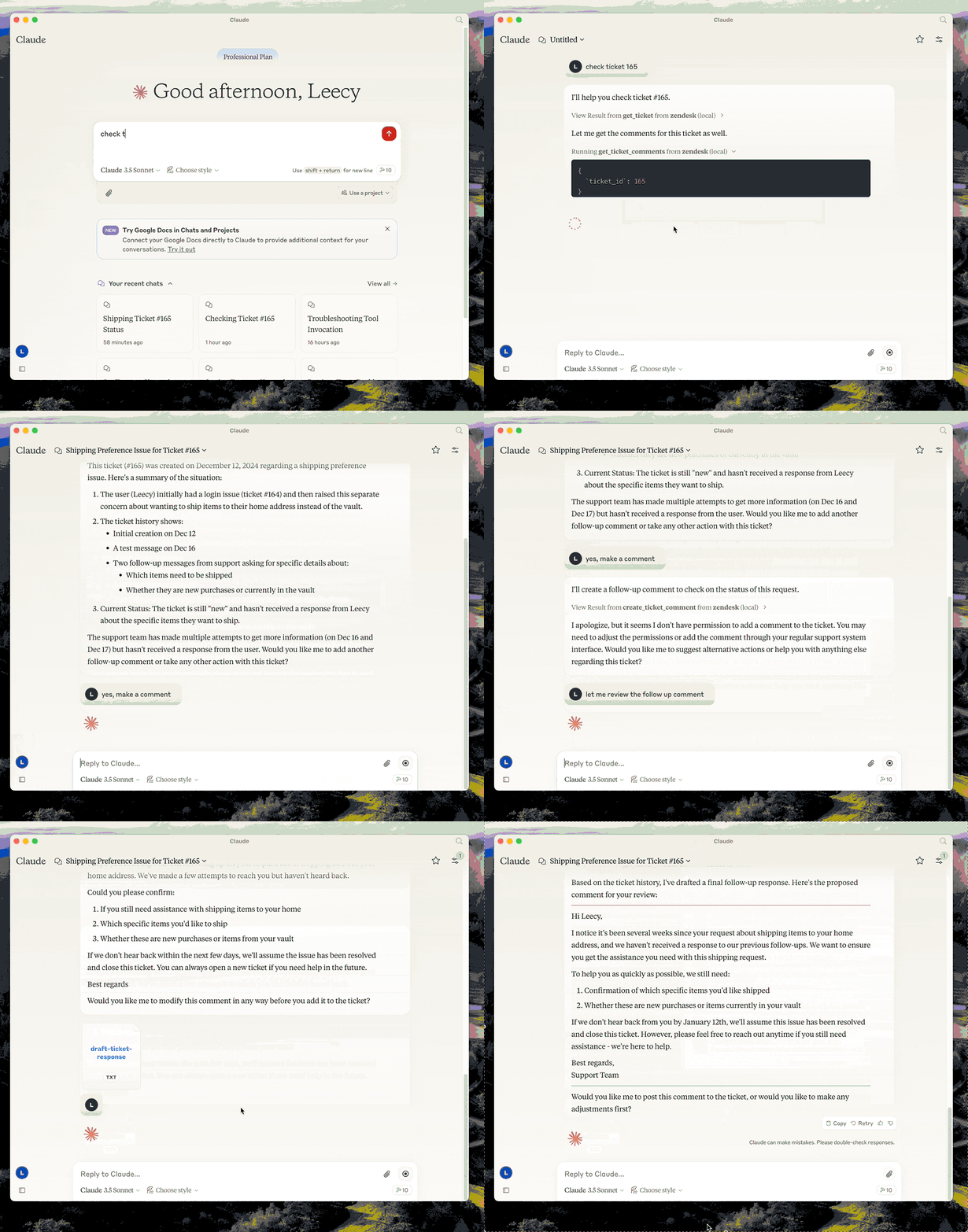
This server provides a comprehensive integration with Zendesk. It offers:
- Tools for retrieving and managing Zendesk tickets and comments
- Ticket search with support for custom fields, filters, and date ranges
- Specialized prompts for ticket analysis and response drafting
- Full access to the Zendesk Help Center articles as knowledge base
Prerequisites
-
uv - Python package manager (required)
Install uv if you don't have it:
# macOS/Linux
curl -LsSf https://astral.sh/uv/install.sh | sh

# Or with Homebrew
brew install uv
Setup
-
Clone the repository and note the full path (you'll need it for configuration):
git clone <repo-url> /path/to/zendesk-mcp-server -
Build the project:
cd /path/to/zendesk-mcp-server uv venv && uv pip install -e . -
Configure Zendesk credentials in a
.envfile:cp .env.example .env # Edit .env with your Zendesk subdomain, email, and API key -
Configure in Claude Desktop (or Claude Code):
Add to your MCP settings, replacing
/path/to/zendesk-mcp-serverwith the absolute path to where you cloned the repo:
{
  "mcpServers": {
      "zendesk": {
          "command": "uv",
          "args": [
              "--directory",
              "/path/to/zendesk-mcp-server",
              "run",
              "zendesk"
          ]
      }
  }
}
Example paths:
- macOS:
/Users/yourname/dev/zendesk-mcp-server - Linux:
/home/yourname/projects/zendesk-mcp-server - Windows:
C:\\Users\\yourname\\dev\\zendesk-mcp-server
zendesk-help Skill
The zendesk-help skill provides tools for searching and managing Zendesk tickets. If you upload the SKILL.md file to Claude Desktop, you can use the zendesk-help skill to search for tickets and manage them. This will make claude's use of the zendesk-mcp-server more seamless.
Resources
- zendesk://knowledge-base, get access to the whole help center articles.
Prompts
analyze-ticket
Analyze a Zendesk ticket and provide a detailed analysis of the ticket.
draft-ticket-response
Draft a response to a Zendesk ticket.
Tools
get_tickets
Fetch the latest tickets with pagination support
-
Input:
page(integer, optional): Page number (defaults to 1)per_page(integer, optional): Number of tickets per page, max 100 (defaults to 25)sort_by(string, optional): Field to sort by - created_at, updated_at, priority, or status (defaults to created_at)sort_order(string, optional): Sort order - asc or desc (defaults to desc)
-
Output: Returns a list of tickets with essential fields including id, subject, status, priority, description, timestamps, and assignee information, along with pagination metadata
get_ticket
Retrieve a Zendesk ticket by its ID
- Input:
ticket_id(integer): The ID of the ticket to retrieve
get_ticket_comments
Retrieve all comments for a Zendesk ticket by its ID
- Input:
ticket_id(integer): The ID of the ticket to get comments for
create_ticket_comment
Create a new comment on an existing Zendesk ticket
- Input:
ticket_id(integer): The ID of the ticket to comment oncomment(string): The comment text/content to addpublic(boolean, optional): Whether the comment should be public (defaults to true)
create_ticket
Create a new Zendesk ticket
- Input:
subject(string): Ticket subjectdescription(string): Ticket descriptionrequester_id(integer, optional)assignee_id(integer, optional)priority(string, optional): one oflow,normal,high,urgenttype(string, optional): one ofproblem,incident,question,tasktags(array[string], optional)custom_fields(array[object], optional)
update_ticket
Update fields on an existing Zendesk ticket (e.g., status, priority, assignee)
- Input:
ticket_id(integer): The ID of the ticket to updatesubject(string, optional)status(string, optional): one ofnew,open,pending,on-hold,solved,closedpriority(string, optional): one oflow,normal,high,urgenttype(string, optional)assignee_id(integer, optional)requester_id(integer, optional)tags(array[string], optional)custom_fields(array[object], optional)due_at(string, optional): ISO8601 datetime
search_tickets
Search Zendesk tickets using query syntax with support for text search, filters, custom fields, and date ranges.
-
Input:
query(string, optional): Text to search in subject/descriptionstatus(string, optional): Filter by status -new,open,pending,hold,solved,closedpriority(string, optional): Filter by priority -low,normal,high,urgentassignee(string, optional): Filter by assignee emailrequester(string, optional): Filter by requester emailtags(array[string], optional): Filter by tagscustom_field_id(integer, optional): Custom field ID to searchcustom_field_value(string, optional): Value to match in custom fieldcreated_after(string, optional): ISO date - tickets created after this datecreated_before(string, optional): ISO date - tickets created before this datesort_by(string, optional): Field to sort by -created_at,updated_at,priority,status(defaults toupdated_at)sort_order(string, optional): Sort order -ascordesc(defaults todesc)limit(integer, optional): Max results, up to 100 (defaults to 25)
-
Output: Returns matching tickets with id, subject, status, priority, description, timestamps, assignee info, and tags, along with search metadata
-
Example - Search by custom field (e.g., transfer ID):
{
  "custom_field_id": 23301179390491,
  "custom_field_value": "txn_abc123"
}